Prebid Video: Complete Guide to Header Bidding for Video Advertising
Prebid Video has revolutionized how publishers monetize their video content by bringing the power of header bidding to video advertising. This comprehensive guide will walk you through everything you need to know about implementing and optimizing Prebid Video for maximum revenue generation.
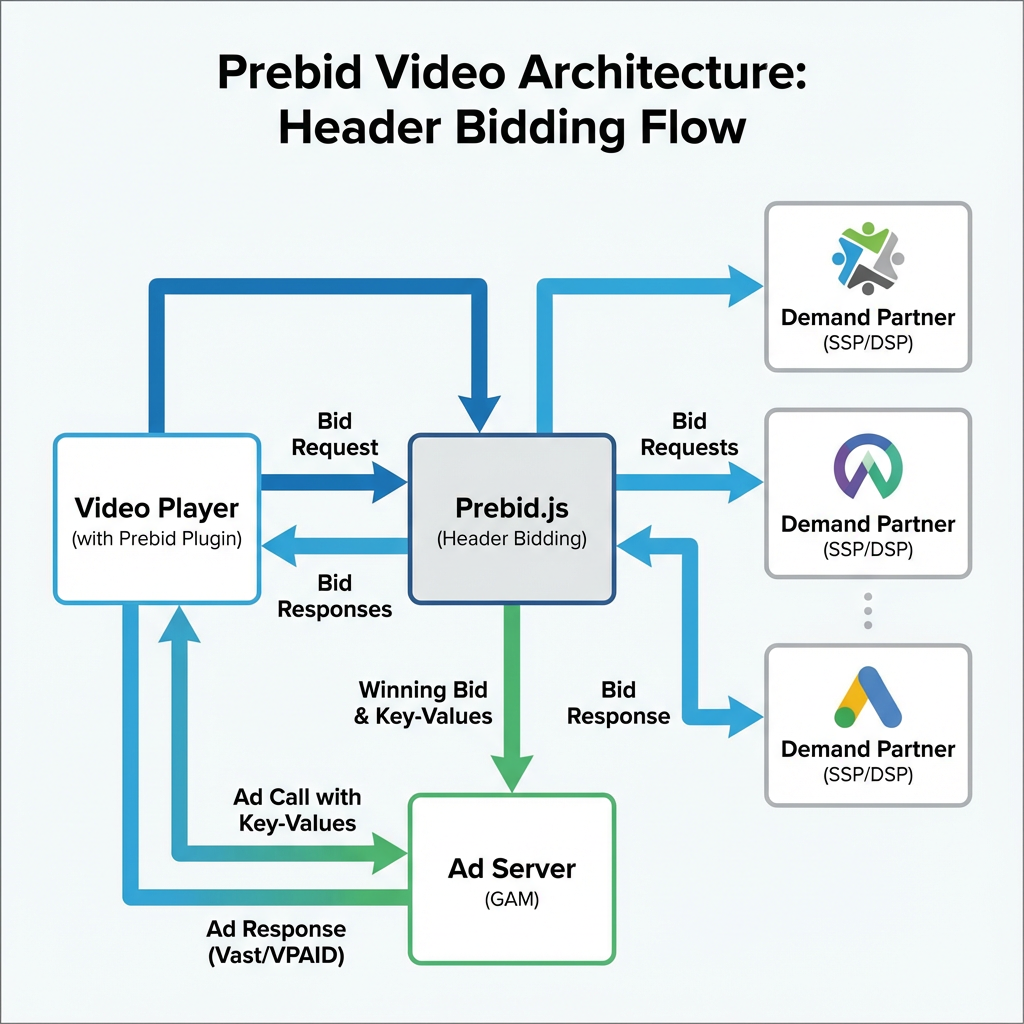
What is Prebid Video?
Prebid Video is an open-source solution that enables publishers to conduct header bidding auctions for video ad inventory. Unlike traditional waterfall setups where ad servers call demand sources sequentially, Prebid Video allows multiple demand partners to bid simultaneously on video ad slots before the ad server makes its decision.
This parallel bidding approach typically results in higher CPMs and increased fill rates, as demand sources compete in real-time for premium video inventory. The solution supports various video ad formats including pre-roll, mid-roll, and post-roll advertisements across desktop, mobile, and connected TV (CTV) environments.
Key Components of Prebid Video Architecture
Prebid.js Integration
The foundation of Prebid Video lies in Prebid.js, which handles the auction logic and demand partner integrations. Publishers integrate the Prebid.js library into their video players, configuring it to work with their existing ad serving infrastructure.
VAST Compliance
Prebid Video maintains full compliance with VAST (Video Ad Serving Template) standards, ensuring seamless integration with existing video players and ad servers. This compliance means that winning bids are delivered as standard VAST responses, maintaining compatibility with your current video advertising stack.
Ad Server Integration
The solution integrates with major ad servers including Google Ad Manager (GAM), allowing publishers to maintain their existing trafficking workflows while benefiting from header bidding competition.
Implementation Process: Step-by-Step Guide
Step 1: Prebid.js Configuration
Begin by configuring Prebid.js with video-specific settings:
var adUnits = [{
    code: 'video-ad-unit',
    mediaTypes: {
        video: {
            playerSize: [640, 480],
            context: 'instream',
            mimes: ['video/mp4'],
            protocols: [2, 3, 5, 6],
            minduration: 5,
            maxduration: 30,
            api: [2]
        }
    },
    bids: [{
        bidder: 'appnexus',
        params: {
            placementId: 'your-placement-id'
        }
    }]
}];
Step 2: Video Player Integration
Integrate Prebid Video with your video player. Many publishers use solutions like Veedmo to streamline this integration process, as it provides built-in support for header bidding workflows and simplifies the technical implementation.
Step 3: Ad Server Setup
Configure your ad server to receive and prioritize Prebid Video bids. This typically involves:
- Creating line items for different price ranges
- Setting up targeting keys for Prebid bids
- Implementing price priority logic
Step 4: Demand Partner Configuration
Add video-enabled demand partners to your Prebid setup. Popular options include:
- AppNexus/Xandr
- Index Exchange
- PubMatic
- Rubicon Project
- SpotX
- Telaria
Each demand partner requires specific configuration parameters, including placement IDs, publisher IDs, and video-specific requirements.
Advanced Configuration Options
Timeout Management
Set appropriate timeout values to balance bid competition with user experience:
pbjs.setConfig({
    video: {
        timeout: 3000
    }
});
Price Granularity
Configure price granularity to optimize revenue while maintaining manageable line item counts:
pbjs.setConfig({
    priceGranularity: {
        buckets: [{
            precision: 2,
            min: 0,
            max: 5,
            increment: 0.05
        }]
    }
});
Video-Specific Targeting
Implement advanced targeting options for video inventory:
var videoAdUnit = {
    code: 'video-slot',
    mediaTypes: {
        video: {
            context: 'instream',
            playerSize: [[640, 480]],
            mimes: ['video/mp4', 'video/x-flv'],
            minduration: 5,
            maxduration: 30,
            startdelay: 0,
            skip: 1,
            playbackmethod: [2],
            api: [1, 2, 5],
            protocols: [2, 3, 5, 6],
            battr: [6, 7],
            linearity: 1
        }
    }
};
Revenue Optimization Strategies
Dynamic Pricing
Implement dynamic floor pricing based on historical performance data, user segments, and content categories. This ensures you’re maximizing revenue potential while maintaining healthy fill rates.
A/B Testing
Regularly test different configurations:
- Timeout values
- Demand partner combinations
- Price granularity settings
- Ad pod configurations
Performance Monitoring
Track key metrics including:
- Win rates by demand partner
- Average CPMs
- Fill rates
- Latency impact
- User experience metrics
Common Implementation Challenges and Solutions
Latency Management
Challenge: Video ads are particularly sensitive to latency, as users expect immediate playback.
Solution: Implement intelligent timeout management and consider using server-side header bidding for CTV environments where client-side latency is more problematic.
VAST Error Handling
Challenge: VAST errors can significantly impact revenue and user experience.
Solution: Implement comprehensive error tracking and fallback mechanisms:
function handleVASTError(error) {
    console.log('VAST Error:', error);
    // Implement fallback logic
    loadBackupAd();
}
Cross-Device Compatibility
Challenge: Ensuring consistent performance across desktop, mobile, and CTV environments.
Solution: Implement device-specific configurations and test thoroughly across all target platforms.
Connected TV (CTV) Considerations
CTV environments present unique challenges for Prebid Video implementation:
Server-Side Integration
Many CTV platforms benefit from server-side header bidding due to limited client-side processing capabilities. Consider implementing Prebid Server for CTV inventory.
Long-Form Content
CTV often involves longer viewing sessions, making mid-roll and ad pod optimization crucial for revenue maximization.
Platform-Specific Requirements
Different CTV platforms have varying technical requirements. Ensure your implementation accounts for:
- Platform-specific VAST requirements
- Audio/video codec support
- User interface constraints
Performance Monitoring and Analytics
Key Performance Indicators (KPIs)
Track these essential metrics:
-
Revenue Metrics
- eCPM trends
- Revenue per session
- Fill rate optimization
-
Technical Performance
- Bid response times
- VAST error rates
- Player integration performance
-
User Experience
- Video start rates
- Completion rates
- User engagement metrics
Debugging Tools
Utilize Prebid’s built-in debugging capabilities:
// Enable debug mode
pbjs.setConfig({
    debug: true
});

// Add console logging
pbjs.onEvent('bidWon', function(bid) {
    console.log('Winning bid:', bid);
});
Future-Proofing Your Implementation
Emerging Standards
Stay current with evolving industry standards:
- VAST 4.2 adoption
- SIMID (Secure Interactive Media Interface Definition) integration
- Privacy-focused advertising solutions
Technology Evolution
Prepare for upcoming changes:
- Third-party cookie deprecation
- Enhanced measurement capabilities
- Improved cross-device targeting
Best Practices for Long-Term Success
Regular Optimization
Schedule monthly reviews of:
- Demand partner performance
- Configuration settings
- Market rate analysis
- Technical performance metrics
Industry Engagement
Stay connected with the Prebid community through:
- GitHub contributions
- Industry conference participation
- Regular documentation reviews
- Community forum engagement
Testing Protocols
Implement systematic testing procedures:
- Staging environment validation
- Cross-browser compatibility testing
- Performance impact assessment
- Revenue impact analysis
Conclusion
Prebid Video represents a significant opportunity for publishers to maximize video advertising revenue through competitive header bidding auctions. Successful implementation requires careful attention to technical details, ongoing optimization, and a commitment to best practices.
By following this comprehensive guide, publishers can establish a robust Prebid Video implementation that delivers improved revenue performance while maintaining excellent user experiences. Remember that optimization is an ongoing process – regular monitoring, testing, and adjustment will ensure continued success in the evolving video advertising landscape.
The key to success lies in balancing technical implementation excellence with strategic revenue optimization, always keeping user experience at the forefront of decision-making processes.