VAST Tag Complete Guide: Implementation, Optimization & Best Practices for Publishers
Video advertising has become the cornerstone of digital monetization strategies, with VAST (Video Ad Serving Template) tags serving as the critical infrastructure that makes programmatic video advertising possible. For publishers and ad ops professionals, understanding VAST tags isn’t just technical knowledge—it’s essential for maximizing video ad revenue and delivering seamless user experiences.
What is a VAST Tag?
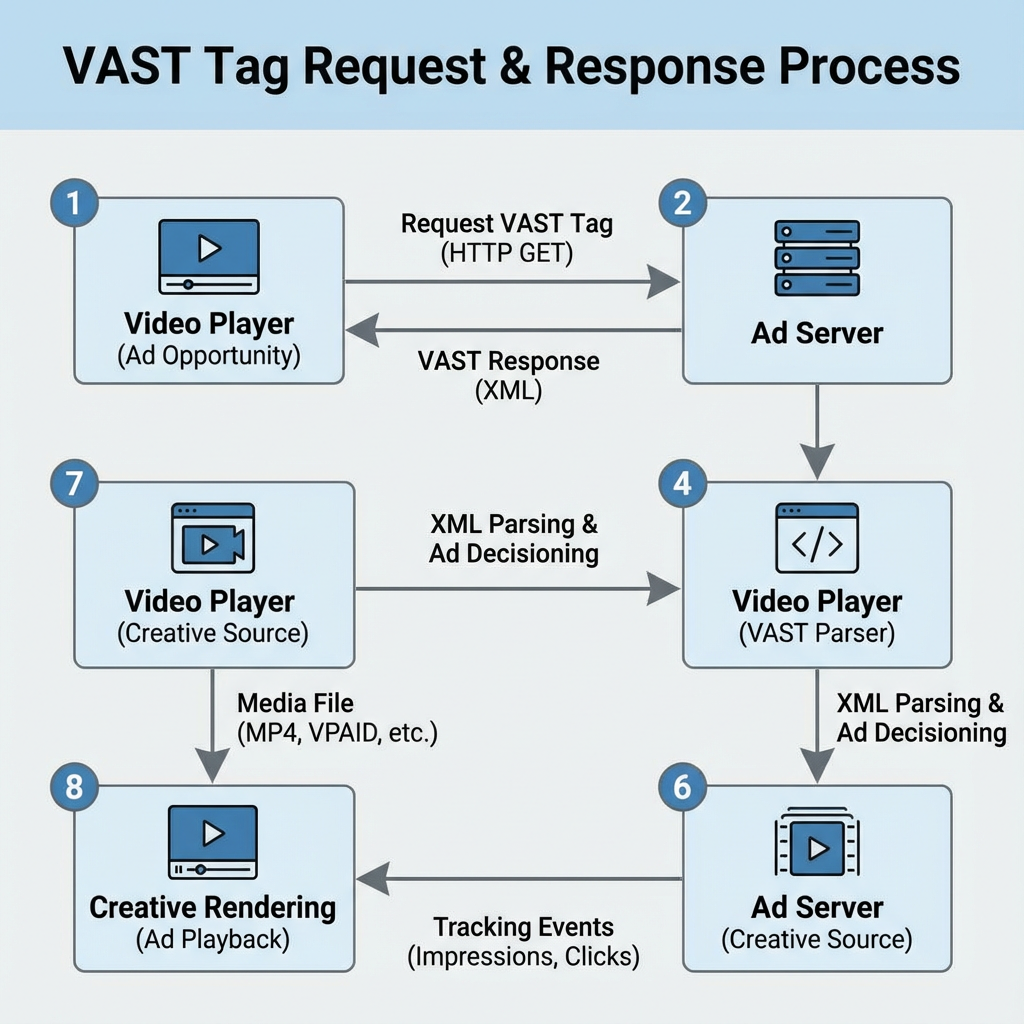
VAST (Video Ad Serving Template) is an XML-based protocol developed by the Interactive Advertising Bureau (IAB) that standardizes communication between video players and ad servers. A VAST tag is essentially a URL that, when called, returns an XML response containing all the necessary information for a video player to display an advertisement.
The VAST tag acts as a bridge between your video content and advertiser creatives, enabling programmatic buying and selling of video inventory across different platforms and ad networks. When a user initiates video playback, the video player calls the VAST tag URL, receives the XML response, and renders the appropriate ad based on the returned data.
VAST Tag Structure
A typical VAST tag URL looks like this:
https://adserver.example.com/vast?placementId=12345&width=640&height=360&correlator=[TIMESTAMP]The XML response contains several key elements:
- Ad metadata: Duration, dimensions, pricing information
- Media files: Video creative URLs in multiple formats
- Tracking pixels: Impression, quartile, and completion beacons
- Click-through URLs: Destination links for interactive elements
- Error handling: Fallback mechanisms and error reporting
VAST Versions: Evolution and Current Standards
Understanding different VAST versions is crucial for compatibility and feature utilization:
VAST 2.0
Introduced linear video ads with basic tracking capabilities. While largely deprecated, some legacy systems still use VAST 2.0.
VAST 3.0
Added support for non-linear ads, companion banners, and enhanced tracking. This version introduced:
- Wrapper ads for improved programmatic capabilities
- Better error handling and reporting
- Enhanced creative verification
- Support for interactive elements
VAST 4.0 and 4.1
The current industry standard, offering:
- Advanced viewability measurement
- Improved fraud protection
- Enhanced mobile support
- Better ad pod management
- Streamlined creative validation
VAST 4.2 and 4.3
The latest versions focus on:
- Enhanced measurement capabilities
- Improved programmatic workflows
- Better support for connected TV (CTV)
- Advanced creative optimization features
Implementation Best Practices
Video Player Integration
Successful VAST implementation requires careful integration with your video player. Modern video players like Veedmo provide built-in VAST support, automatically handling the complexities of ad serving, tracking, and error management while ensuring optimal user experience.
Key Implementation Steps:
- Configure Ad Breaks: Define pre-roll, mid-roll, and post-roll positions
- Set Timeout Parameters: Implement reasonable timeout values (typically 10-15 seconds)
- Handle Multiple Formats: Ensure support for MP4, WebM, and other video formats
- Mobile Optimization: Account for mobile-specific requirements and constraints
Error Handling and Fallbacks
Robust error handling is essential for maintaining revenue and user experience:
<Error><![CDATA[https://adserver.example.com/error?code=[ERRORCODE]]]></Error>Implement cascading fallbacks:
- Primary VAST tag fails → Secondary ad network
- Secondary fails → Direct-sold backup creative
- All ads fail → Return to content immediately
Tracking Implementation
Proper tracking ensures accurate reporting and payment:
Essential Tracking Events:
- Impression: Ad creative loaded and visible
- Start: Video ad playback begins
- Quartiles: 25%, 50%, 75% completion markers
- Complete: Ad plays to completion
- Click: User interaction with ad creative
Optimization Strategies for Maximum Revenue
Ad Request Optimization
Timing and Frequency
- Pre-roll: Request ads just before content playback to ensure freshness
- Mid-roll: Pre-fetch mid-roll ads during content playback to reduce latency
- Post-roll: Only request if user engagement indicates completion likelihood
Parameter Passing
Maximize ad targeting by passing relevant parameters:
https://adserver.example.com/vast?placementId=12345&age=25-34&interests=technology&device=mobile&geo=US-CA-SFHeader Bidding for Video
Implement video header bidding to increase competition and CPMs:
- Parallel Bidding: Send bid requests to multiple SSPs simultaneously
- Timeout Management: Balance bid density with user experience
- Floor Price Optimization: Set dynamic floor prices based on historical performance
- Bid Response Handling: Efficiently process and rank bid responses
Creative Quality Management
File Format Optimization
- MP4: Primary format with H.264 encoding
- WebM: Fallback for browsers with limited MP4 support
- Multiple Bitrates: Adapt to varying network conditions
Duration Strategy
- Pre-roll: 15-30 seconds optimal for user retention
- Mid-roll: Up to 60 seconds acceptable during natural content breaks
- Post-roll: 15-30 seconds to maintain engagement
Troubleshooting Common VAST Issues
XML Parsing Errors
Symptoms: Ads fail to load, error tracking fires Solutions:
- Validate XML response format
- Check for special characters in CDATA sections
- Verify proper URL encoding
- Test with XML validators
Creative Loading Failures
Symptoms: Ad requests succeed but creatives don’t display Solutions:
- Verify media file URLs are accessible
- Check video format compatibility
- Confirm proper MIME types
- Test across different browsers and devices
Tracking Discrepancies
Symptoms: Revenue reporting doesn’t match ad server data Solutions:
- Implement all required tracking pixels
- Ensure proper event timing
- Verify impression counting methodology
- Cross-reference with ad server logs
Performance Optimization
Symptoms: Slow ad loading, high abandonment rates Solutions:
- Optimize timeout settings
- Implement ad preloading
- Use CDN-hosted creative assets
- Monitor network performance metrics
Advanced VAST Features
Ad Pods and Competitive Separation
Ad pods allow multiple ads in sequence with built-in competitive separation:
<AdPod>
    <Sequence>1</Sequence>
    <CompetitiveSeparation category="automotive">120</CompetitiveSeparation>
</AdPod>
Interactive Elements
VAST 4.x supports rich interactive features:
- Clickable overlays: Drive engagement without interrupting playback
- Social sharing: Enable content amplification
- Form collection: Gather user data for lead generation
- Product showcases: Enable direct e-commerce integration
Viewability and Fraud Protection
Modern VAST implementations include sophisticated measurement:
- Viewability tracking: Verify ad visibility according to IAB standards
- Invalid traffic detection: Identify and filter fraudulent activity
- Brand safety: Ensure ads appear in appropriate content contexts
- Verification partners: Integrate with third-party measurement providers
Performance Monitoring and Analytics
Key Performance Indicators
Track these essential metrics for optimization:
Revenue Metrics
- Fill Rate: Percentage of ad requests successfully filled
- CPM: Cost per thousand impressions
- Revenue per Session: Average revenue generated per user session
- Completion Rate: Percentage of ads played to completion
Technical Metrics
- Ad Load Time: Time from request to creative display
- Error Rate: Percentage of failed ad requests
- Timeout Rate: Frequency of request timeouts
- Format Support: Creative compatibility across devices
Reporting and Analysis
Implement comprehensive reporting to identify optimization opportunities:
- Real-time Monitoring: Track performance metrics continuously
- Trend Analysis: Identify patterns in performance data
- A/B Testing: Experiment with different configurations
- Predictive Analytics: Forecast performance and revenue trends
Future of VAST Technology
Connected TV (CTV) Evolution
VAST continues evolving to support the growing CTV market:
- Enhanced targeting: Improved audience segmentation capabilities
- Interactive features: Rich media experiences on large screens
- Cross-device tracking: Unified user journey measurement
- Advanced analytics: Deeper insights into viewer behavior
Privacy and Compliance
Emerging privacy regulations impact VAST implementation:
- Consent management: Integration with CMP platforms
- Data minimization: Reduced data collection requirements
- Transparency: Enhanced user control over ad experiences
- First-party data: Increased reliance on publisher-owned data
Conclusion
Mastering VAST tags is essential for publishers seeking to maximize video advertising revenue while maintaining optimal user experiences. Success requires understanding technical implementation details, optimization strategies, and emerging industry trends. By following the best practices outlined in this guide, publishers can build robust video advertising systems that adapt to changing market conditions and technological advances.
Regular monitoring, testing, and optimization ensure VAST implementations remain effective as the digital advertising landscape continues evolving. Publishers who invest in comprehensive VAST knowledge and implementation will be best positioned to capitalize on the continued growth of video advertising across all digital platforms.